A4 proposal / Page 5 source
Source for page 5 of 5 of the actual generated example. Companies, metrics and proposals are fictional. This excerpt is not a standalone document: it needs the shared theme, configuration and referenced files.
Markdown for this page
Section titled “Markdown for this page”An excerpt of document.md, split at its explicit page boundary. Separate fixed pages with <!-- wwpo:break -->.
document.md
Section titled “document.md”<!-- wwpo:page size=A4 orientation=landscape flow=fixed class=comparison-appendix -->
# 04 / Compare the pilot assumptions
**Landscape appendix / Fictional working-time comparison**
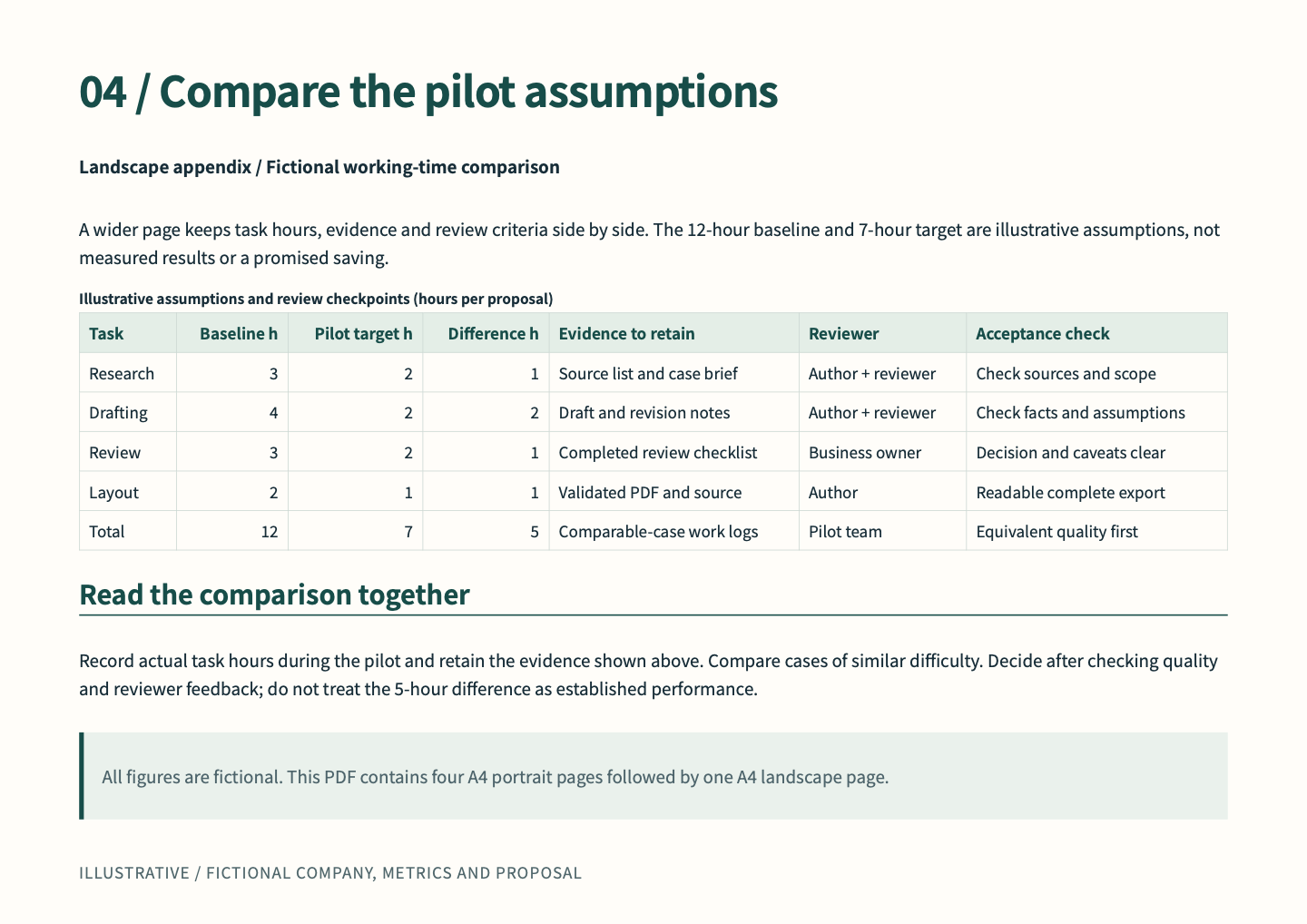
A wider page keeps task hours, evidence and review criteria side by side. The 12-hour baseline and 7-hour target are illustrative assumptions, not measured results or a promised saving.
<!-- wwpo:table data=comparison caption="Illustrative assumptions and review checkpoints (hours per proposal)" -->
## Read the comparison together
Record actual task hours during the pilot and retain the evidence shown above. Compare cases of similar difficulty. Decide after checking quality and reviewer feedback; do not treat the 5-hour difference as established performance.
> All figures are fictional. This PDF contains four A4 portrait pages followed by one A4 landscape page.Referenced visuals and data
Section titled “Referenced visuals and data”data/comparison.csv
Section titled “data/comparison.csv”Task,Baseline h,Pilot target h,Difference h,Evidence to retain,Reviewer,Acceptance check
Research,3,2,1,Source list and case brief,Author + reviewer,Check sources and scope
Drafting,4,2,2,Draft and revision notes,Author + reviewer,Check facts and assumptions
Review,3,2,1,Completed review checklist,Business owner,Decision and caveats clear
Layout,2,1,1,Validated PDF and source,Author,Readable complete export
Total,12,7,5,Comparable-case work logs,Pilot team,Equivalent quality first
Design and reproduction
Section titled “Design and reproduction”Headings, spacing, color, tables and page footnotes use the shared CSS and business preset. Page directives and visual definitions shown above also affect the output. The source ZIP on the example overview contains the complete document and required files. Save changes, then preview, validate and export to check them.